

CORE FIELD
Alerts and reports
An alert reacts to a condition. A report delivers content on a schedule.
| Need | Use |
|---|---|
| “Tell me when CPPW starts a stop” | Alert |
| “Send the dashboard every Monday at 8:00 AM” | Report |
Example: alert when CPPW starts a stop
The condition should detect a transition, not repeat the same state every minute:
- The previous window shows CPPW was running.
- The last five minutes show it remains stopped.
- The query returns
1only when the stop begins. - The alert sends when the result equals
1.
Alert · CPPW stop begins Transition logic, not a repeated state
Previous window CPPW is running
Current window Stopped for 5 minutes
Condition Result equals 1
Action Send once
Example: weekly visual report
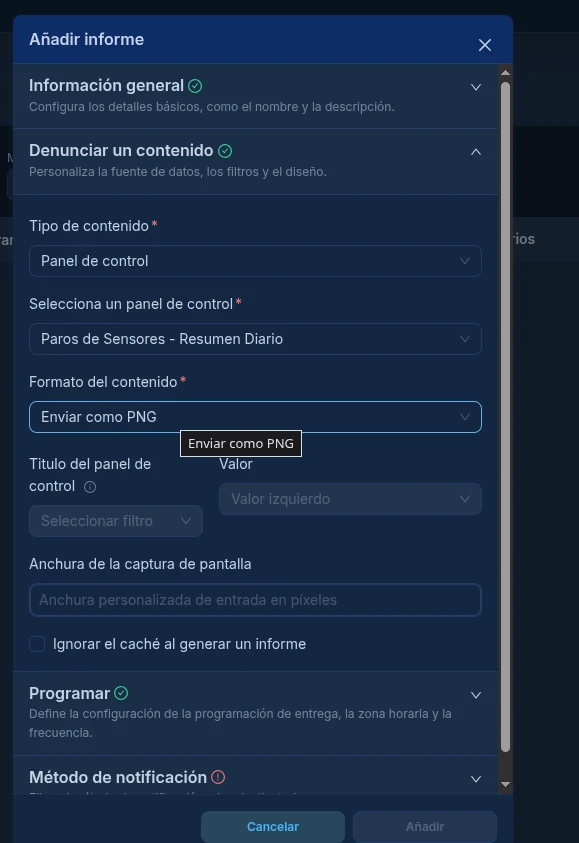
- Open Reports and click + Report.
- Choose Dashboard.
- Select Sensor Stops - Daily Summary.
- Format: Send as PNG.
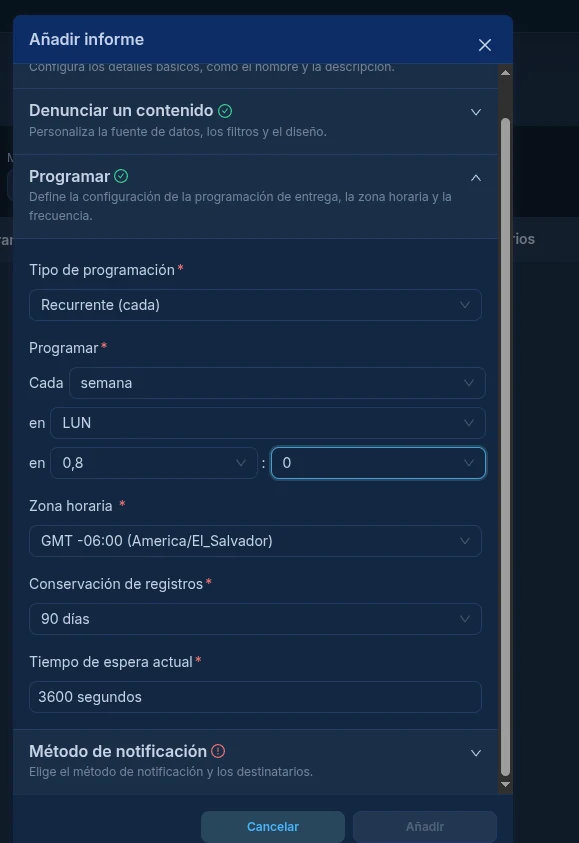
- Schedule Monday, 8:00 AM.
- Time zone: America/El_Salvador.
If the PNG is too long
The automated browser captures the dashboard’s actual height.
- Edit the dashboard.
- Move charts upward.
- Reduce empty rows or space.
- Save.
- Test the report again.
Changing width improves horizontal fit, but does not remove empty height by itself.
Resultado esperadoExpected result
The alert sends once when the event begins; the report arrives on schedule in the right time zone with a readable dashboard.